The platform you select shapes how customers book, how staff work, how payments are collected, and how clearly you can see what is happening in the business. A good fit makes the operation easier to run and gives you room to grow. A poor fit creates workarounds that spread into every part of the day.
I've been where you are. I run a pet care facility, I have spent more hours than I care to admit evaluating software, and I eventually built software when I could not find the right fit. Today, as a co-founder of Goose, I speak with business owners every day who are comparing platforms or wondering whether switching will be worth the trouble.
Let’s get this out of the way: I believe Goose is one of the best options available. I also know it will not be the right choice for every business. This guide is meant to help you understand the tradeoffs, test the claims vendors make, and choose the system that best fits the business you are building.
Switching software can feel like putting off a dentist appointment when you know you have a cavity. Avoiding it is easier today, but the underlying problem rarely gets smaller. The good news is that teams often adapt faster than owners expect, especially when the new system removes daily frustration instead of adding another layer of it.
TLDR Version
I also know some of you are not reading this whole guide. No judgment. Here is the TLDR (too long, didn’t read) version. Consider it a starting point, not a substitute for a demo. The rest of the guide explains what those differences mean in practice.
#
Goose
Gingr
MoeGo
Paw Partner
Who is it for:
Growth-minded pet care businesses that want to expand services, add locations, and build a more sophisticated operation.
Established pet care businesses that value a familiar, widely used platform with workflows their team may already know.
Businesses looking for a modern interface and familiar operating workflows, with particularly strong appeal for grooming-focused and appointment-based businesses.
Smaller pet care businesses that want an affordable, straightforward platform covering the core tools needed to run their operation.
Online Booking
New and existing customers see real-time availability and receive immediate confirmation based on your rules.
Customers submit reservation and appointment requests for staff to review and confirm.
Businesses can automatically accept requests or route them for review by service and profile conditions.
Customers can book through the website or mobile app, purchase packages, upload vaccines, and pay deposits.
Built-in marketing
Email and SMS campaigns, segmentation, and automations connected to CRM, booking, and invoice data, including abandoned-booking and churn-prevention workflows.
Email and SMS campaigns, scheduled sends, templates, and recipient groups.
Email campaigns, mass SMS, smart filters, automations, and campaign reporting.
Campaigns, automated events, email and push notifications, and optional text messaging.
AI-enabled workflows
Native AI assistance for report cards, customer messaging, and marketing content.
AI-assisted lead response and reputation tools are available through the Broadly integration, which requires a separate purchase.
AI-assisted call summaries and an AI receptionist are available through integrations; AI writing and review tools are also available in selected products.
No AI workflow features were listed publicly when this guide was researched.
Ad attribution
Native Google and Meta attribution from ad engagement through confirmed purchase and revenue, with conversion data sent back to the ad platforms.
No native ad-to-revenue attribution was listed publicly.
Google Ads reporting is in beta for eligible Ultimate-plan users and includes leads, bookings, revenue, and ROI.
No native ad-to-revenue attribution was listed publicly.
Reputation management
Built-in review requests, monitoring, and AI-assisted responses, currently in beta.
Available through Broadly, which requires a separate purchase.
Built-in review requests, with expanded monitoring and AI-assisted response tools available in beta or early access.
Available through integrations such as Broadly or ReviewFlowz, which require separate purchases.
Credit card fee recovery
Credit Card Offset is designed to recover approximately 85% of eligible credit card processing costs.
Built-in surcharging applies a configurable rate of up to 3% to eligible credit card transactions.
Built-in surcharging can pass the full fee or a custom amount to the customer.
No built-in credit card fee recovery was listed publicly.
1. Why Do Pet Care Businesses Look for New Software?
I have spoken with thousands of pet care business owners, from single-location operators to groups managing facilities across several states. One thing still surprises me: people often assume their software problems are unique. Usually, they are not. The details vary, but the same frustrations show up again and again.
Here are the most common reasons businesses start looking. If several sound familiar, your software may be asking too much of you.
1. Better Customer Experience
When software falls short, the burden usually lands on the customer. They are asked to call for availability, wait for approval, repeat information, or work through a portal that feels dated. Customers rarely separate the software from the business. They simply remember whether the experience was easy.
A better shopping experience results in more upsells and higher average order values.
2. Stronger Online Presence
Your website should do more than describe the business. It should help a customer understand the options, book, add upgrades, and pay. A disconnected booking experience can waste the marketing effort that brought the customer to the site.
3. Operational Efficiency
Some systems can technically complete a task while requiring far too many clicks, screens, or manual updates. It is like owning a Ferrari and driving it in first gear everywhere you go. The difference becomes painfully obvious during a busy check-in window. Slow workflows increase training time, create more room for error, and make growth harder than it needs to be.
4. Primary Service Integration
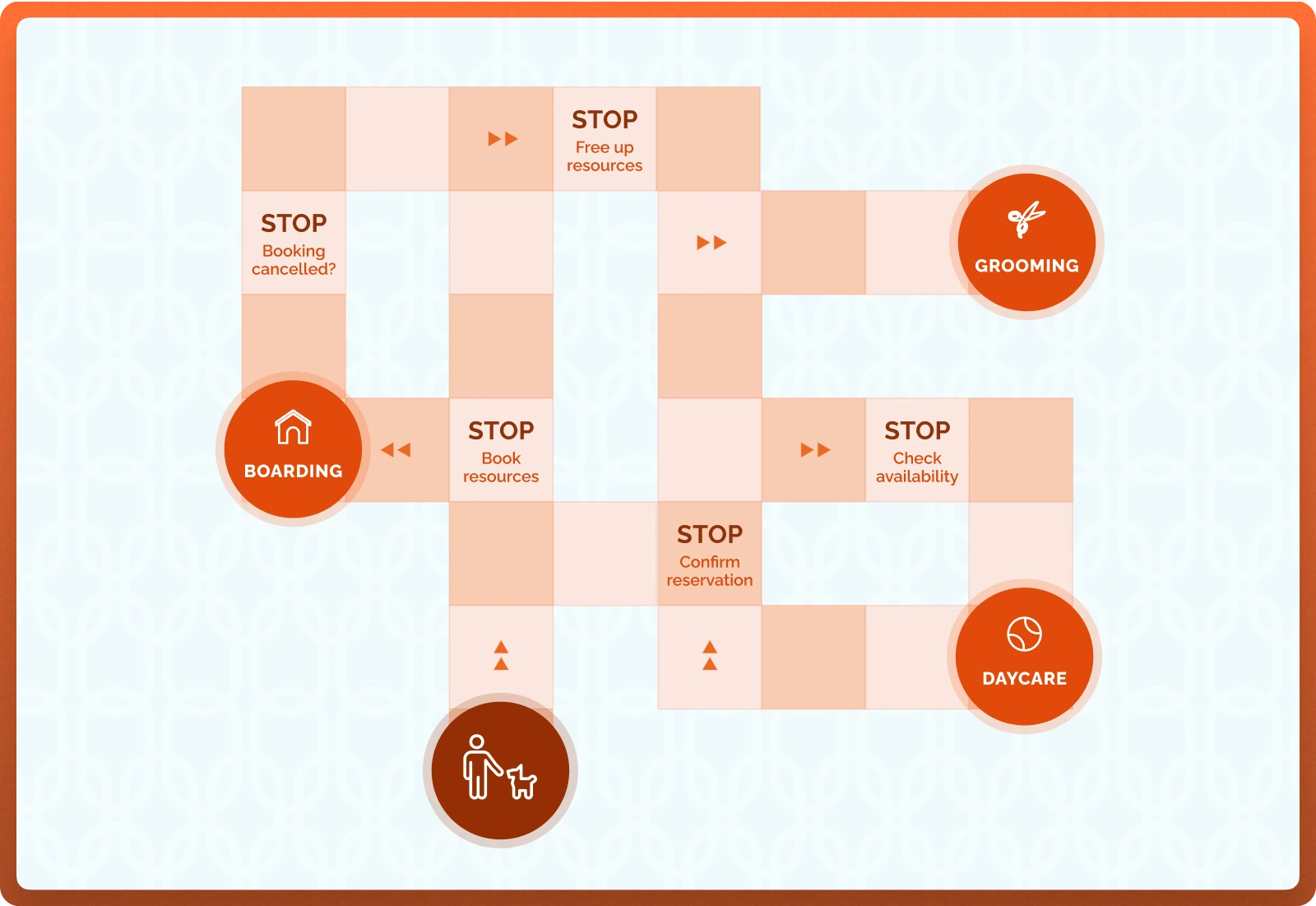
Boarding, daycare, grooming, training, and retail often happen during the same visit. Software that treats each service as a separate island forces staff to update multiple calendars, invoices, and task lists. A connected system should understand the whole visit and put each service into the right operational workflow.
Disjointed systems lead to errors and frustration
5. Accurate Reporting
Accurate reporting is non-negotiable, especially if you’re planning for growth or have stakeholders who want regular updates. A system may appear fine until a boarding stay crosses month end, deposits need to be deferred, or an owner asks for location-level profitability. If getting a basic answer requires a spreadsheet rescue mission every month, the reporting is not doing its job.
6. Revenue Management
Pet care inventory expires. An empty room last night cannot be sold today. Operators increasingly want tools that adjust rates, protect premium inventory, set minimum booking values, and change the available offer mix during high-demand periods. Those rules also need to be manageable enough that the team actually uses them.
Revenue management can help you increase the quality of your bookings during busy periods.
7. Customer Support
You don’t know how good (or bad) a company’s customer support is until you really need it. And if your current software provider’s idea of “support” is a 24-hour turnaround on an email request, that’s not going to cut it. Issues don’t happen at convenient times, and when something goes wrong, you need solutions immediately.
8. Stability
The issue is not always a dramatic outage. More often, owners describe “general bugginess”: small problems that accumulate until nobody fully trusts the system. Customers do not know whether a failed payment or broken portal came from the vendor. They only know your business did not work the way they expected.
9. Ability to Scale
A system that works for one location and two services may struggle as the business adds memberships, staff roles, service combinations, and financial reporting. Multi-location growth adds another layer: shared customer records, corporate controls, location-specific rules, and consolidated reporting.
10. Starting a New Business
New operators have the opposite problem. They do not yet know which limitations will matter. Choosing the cheapest or simplest system can feel responsible, but a second migration two years later is expensive and disruptive. Think about the business you expect to run in two or three years, including the services, locations, and reporting discipline you plan to add.
The right platform should solve the problems that started your search and create room for better ways of operating. Replacing old software with a newer version of the same limitations rarely produces the result you hoped for.
2. Advanced Features
The basics keep the doors open. Advanced features, like the ones I mention below, help the business grow, use inventory more intelligently, and remove work that does not add vaule to your business. These are the areas where platforms begin to feel meaningfully different.
Online Booking
Since I launched one of the first booking engines for pet care, I have a bit of a soapbox here. The phrase “online booking” is used for everything from a basic request form to a real-time reservation engine. Those are very different customer experiences.
The easiest way to compare them is to separate confirmation-based booking from request-based booking.
Question
Confirmation-based Booking
Request-based Booking
When is the reservation confirmed?
During the same customer session, after the system applies eligibility, capacity, policy, and payment rules.
After a staff member reviews and approves the request, or after an automation accepts it.
What does a new customer do?
Creates a profile, provides the required information, and completes the eligible booking in one flow.
Submits information and waits for the business to respond or approve.
How are upsells and add-ons sold?
The customer can shop and add services while the primary booking is being completed.
Add-ons may be selected with the request, but the final reservation is still pending.
What happens after submission?
The customer receives confirmation.
The customer may continue comparing options until approval arrives.
Imagine booking a hotel online. One site shows you what’s available, lets you choose a room, and confirms your stay. Another asks you to submit a form and wait for someone to get back to you. Inconceivable!
Actually, stop imagining that. It barely exists, because customers prefer the first experience: the one that immediately answers the question they came to ask, “Do I have a reservation?”
While this instant, real-time system is standard for hotels and e-commerce, pet care businesses often use requests because they want control and managing individual requests give them the feeling of control. They need vaccination records, behavioral evaluations, breed or age rules, capacity limits, and payment policies. A modern confirmation-based system will apply those rules before the transaction is completed and shifts room assignment towards the check-in date. A request-based system keeps a person in the approval loop and requires that rooms be assigned as reservations are accepted, resulting in “pet tetris” as reservations are moved around.
Confirmation based booking doesn’t leave you waiting around
Gingr primarily routes customer requests to staff for approval. MoeGo lets businesses choose automatic acceptance or manual review by service and profile conditions. Goose is designed around confirmation-based booking, with prerequisites and exceptions enforced inside the booking flow.
In my view, confirmation-based booking is the stronger model when the software can enforce your rules. It reduces front-desk work, captures demand while the customer is ready to buy, and creates a natural place to sell upgrades. It also increases bookings and revenue because reservations can be accepted around the clock. At my facility, moving to confirmation-based booking was associated with a 40% increase in customer growth, largely because fewer people dropped out of the process.
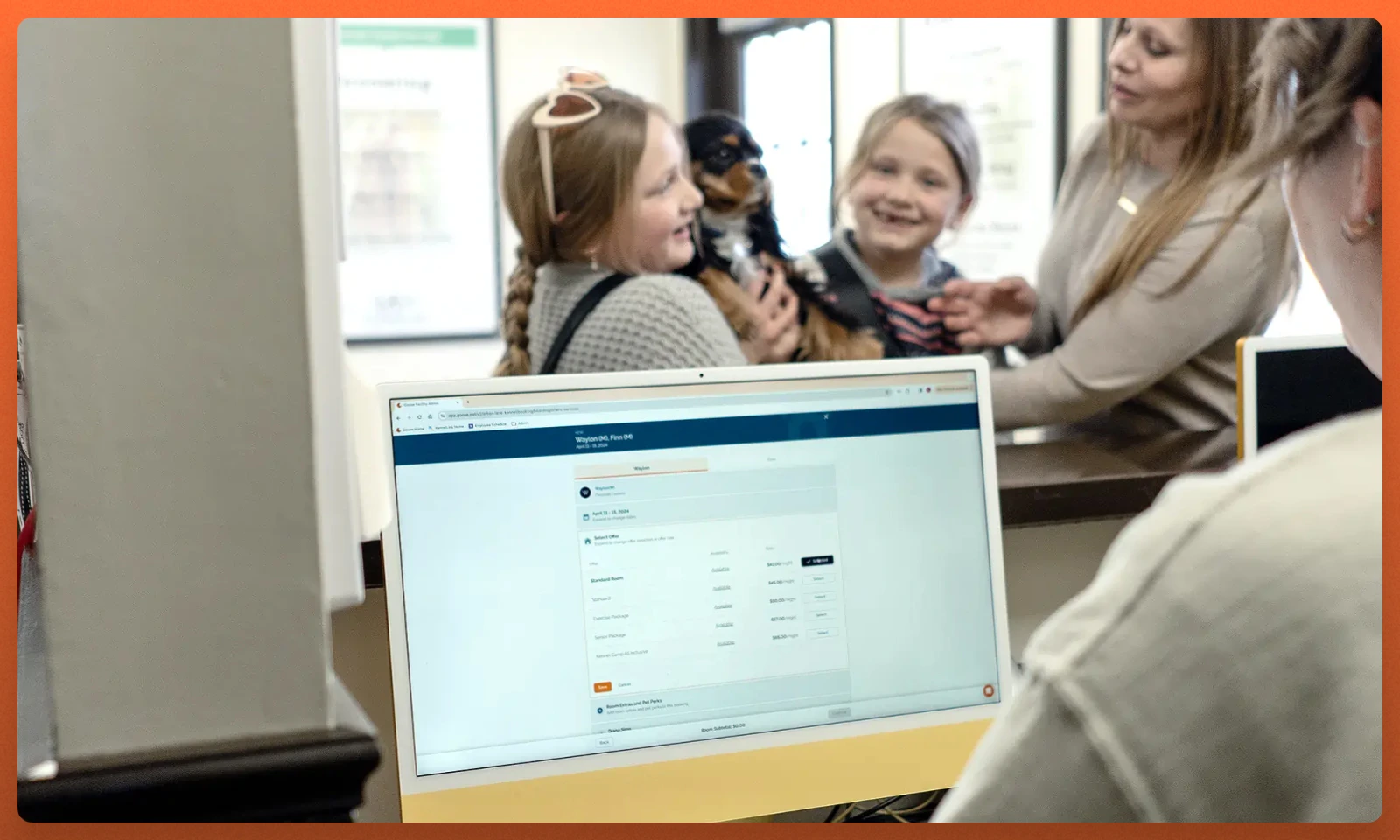
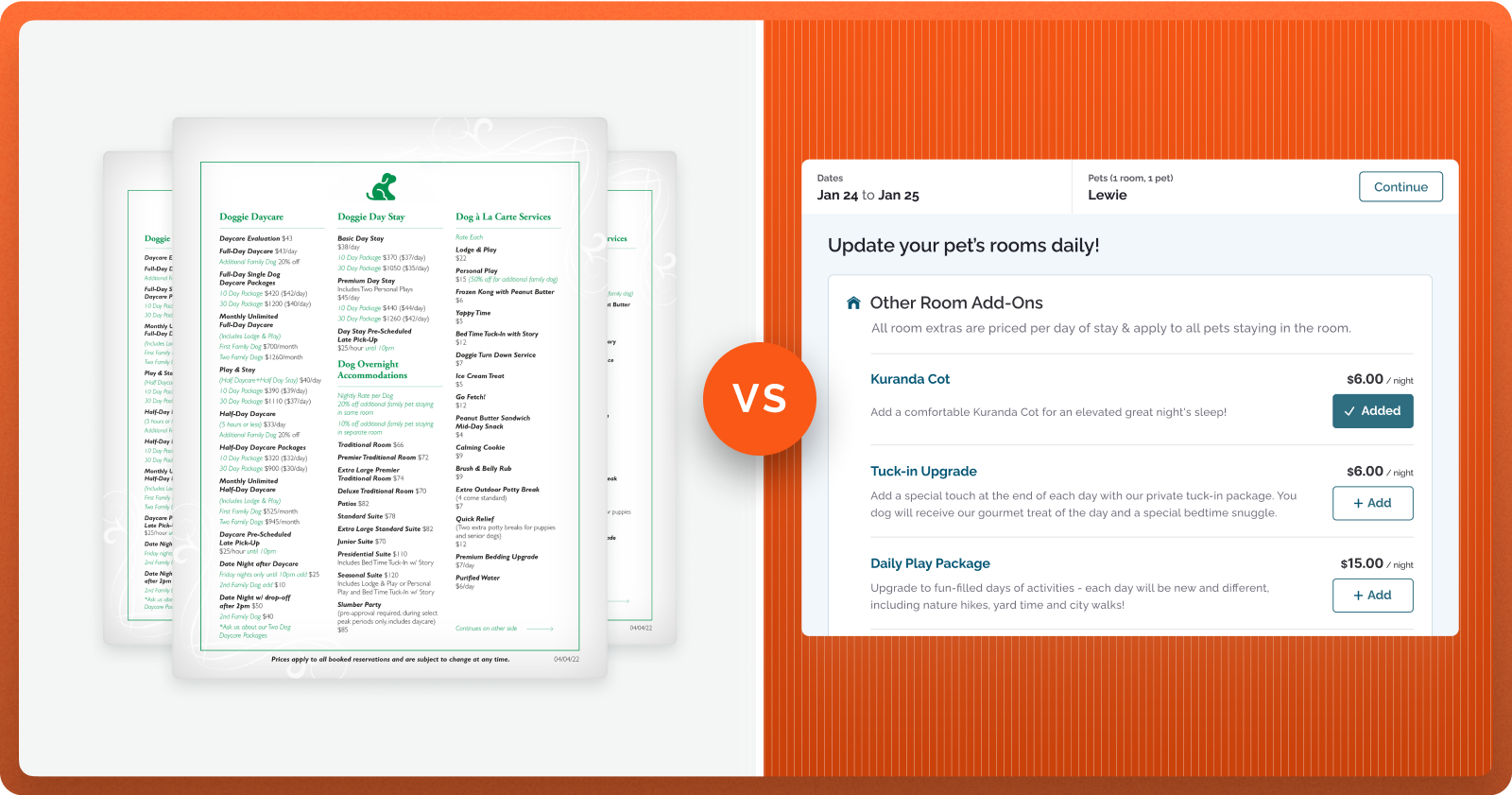
Online booking also creates a natural opportunity to sell add-ons and upgrades. Customers can review options privately, compare them, and choose what they value. This is often more effective than asking a front-desk employee to remember a sales pitch during check-in.
At my facility, The Kennel at Arbor Lane, we found that online primary bookings carried a 3% higher average order value and 49% more pet perks than bookings handled at the desk. Those results came from the structure of the shopping experience, not from adding pressure to the customer.
Advanced Merchandising
Advanced merchandising is the ability to shape how services are packaged and presented. A strong platform should support named offers, room upgrades, multi-pet options, service bundles, and add-ons that apply once per stay or separately to each pet.
Online booking systems allow customers to opt into premium services at their own pace and in-context with the services they are already booking.
The storefront is only half the job. If a customer adds grooming to a boarding stay, that service should appear on the grooming calendar, the invoice, the pet’s visit, and the appropriate staff task list. If employees have to rebuild the package by hand, the software has simply moved the work to a new place.
During a demo, ask the vendor to combine services that operate differently, such as training during a boarding stay or grooming during daycare. That is where systems built around separate modules tend to show their seams.
Revenue Management
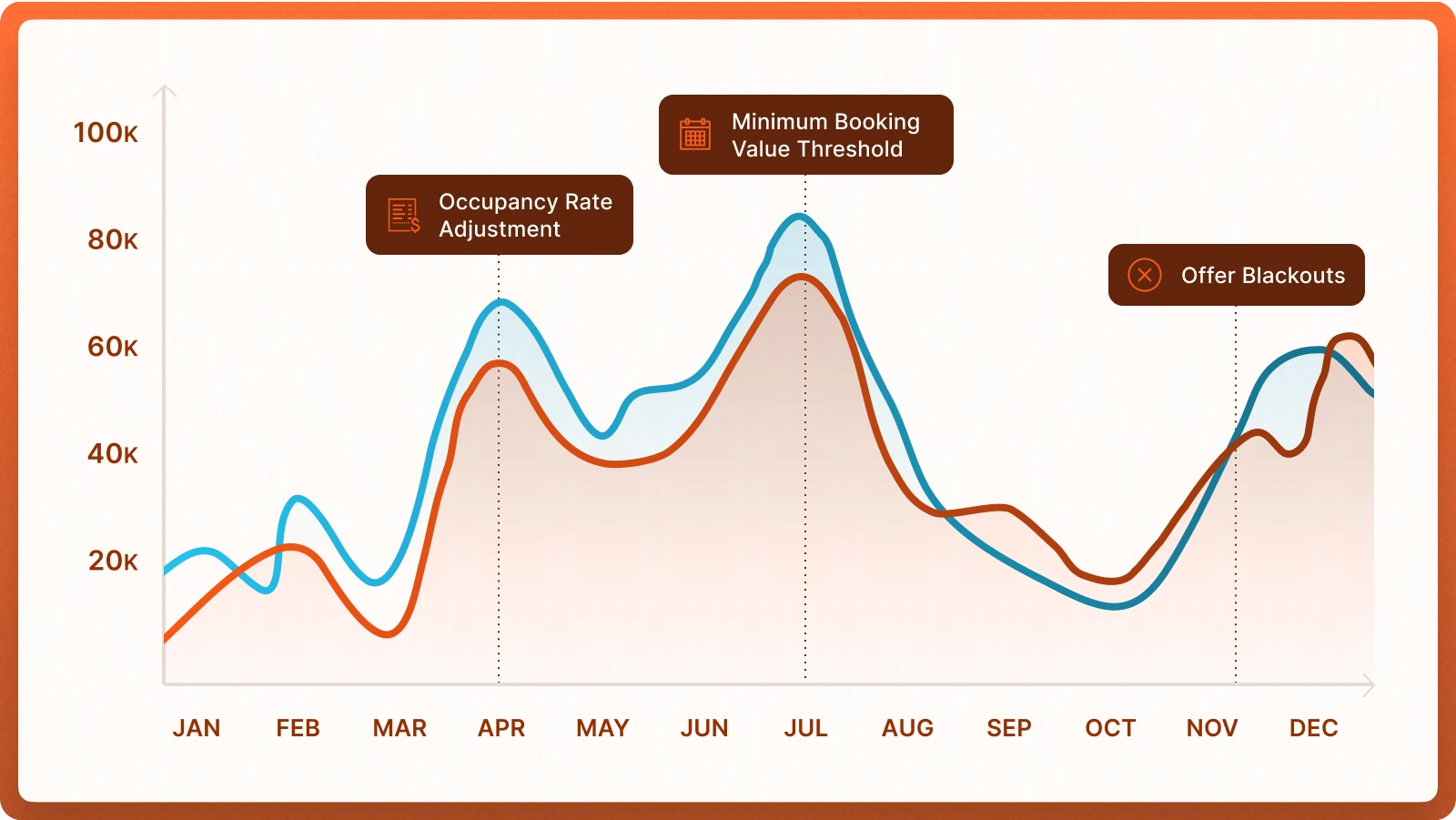
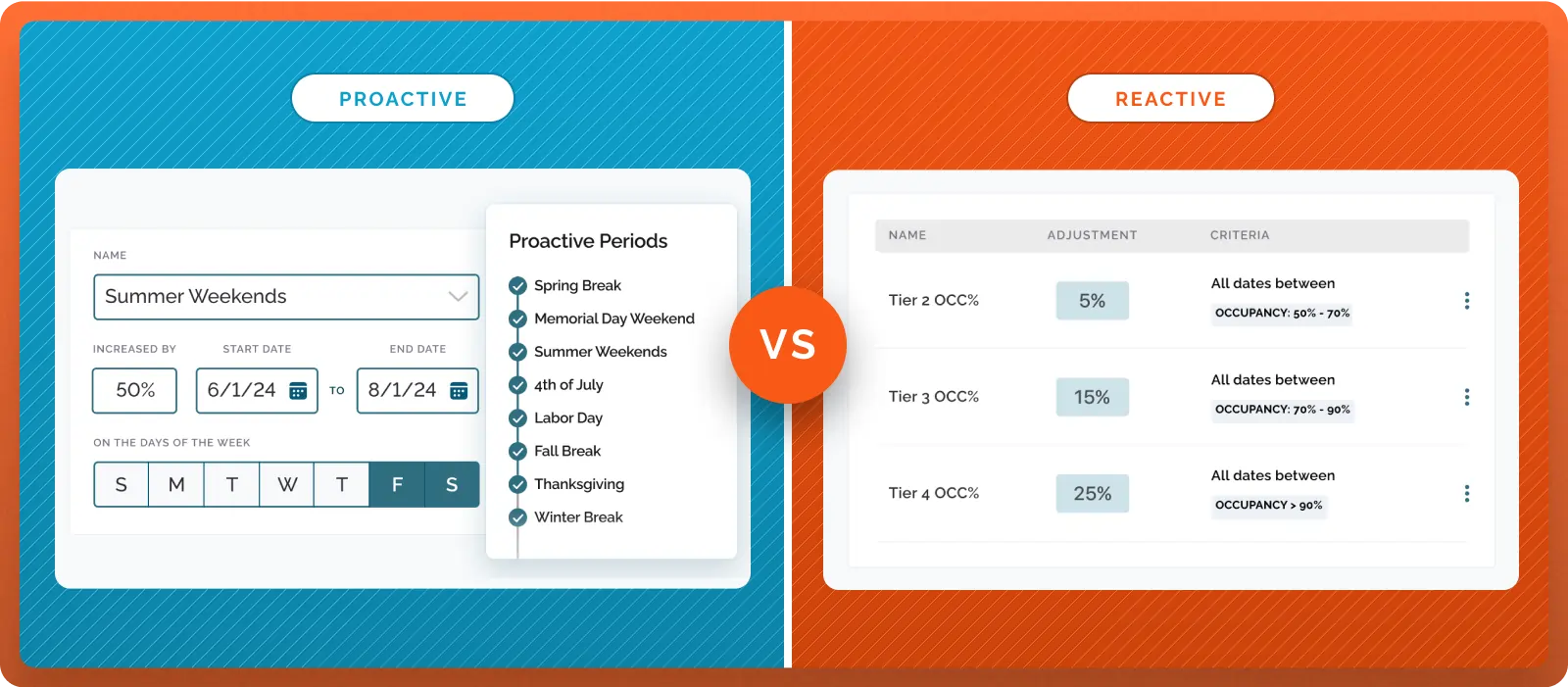
Revenue management is the practice of selling the right service, to the right customer, at the right time and price. Occupancy-based rate changes are one useful tool, but a complete strategy usually combines several types of rules.
Rate Adjustments - adjust your rates up or down based on date or occupancy (or both).
Minimum Booking Values - reserves precious inventory for high value bookings and increases average order value.
Offer Blackouts - remove your least expensive offerings in favor of more expensive packages during periods where you are likely to sell out.
Rate adjustments can contain proactive and reactive strategies.
For example, you may want July 4 pricing to begin before occupancy reaches a threshold, then tighten the available offer set as the holiday fills. The software should make those rules clear enough to explain and simple enough to maintain. The world of revenue management deserves more space than I can give it here. Fortunately for you, I wrote a whole guide about it.
Marketing Engagement and Retention
Marketing belongs in this guide because the operating system already contains the customer record, booking history, invoices, services, and future reservations. That data makes it possible to send a useful message at the moment it matters. When marketing lives somewhere else, teams export lists, rebuild segments, and lose the timing that makes a campaign relevant.
A capable built-in system should support segmentation, branded email, SMS, scheduled campaigns, automated triggers, consent management, and performance reporting. It should also understand operational events such as an abandoned booking, a completed stay, an expiring vaccine, or a customer who has quietly stopped returning.
Question
Goose
Gingr
MoeGo
Paw Partner
Segmentation
Uses live CRM, booking, invoice, service, and activity data. Useful for prospects, inactive customers, frequent customers, service users, and unfinished bookings.
Provides predefined campaign groups based on reservation history, customer age, vaccination status, service type, and location. Custom lists can also be built from reports and filtered customer tables.
Provides detailed smart filters based on customer status, type, tags, location, source, appointment history, pet breed, vaccination status, and other attributes.
Supports targeted campaign groups and recipient lists built from operational data and filtered reports.
Email
Native drag-and-drop builder with brand styling, mobile-friendly layouts, personalization, scheduling, and integrated customer data.
Native campaigns with reusable templates, personalization fields, attachments, recipient management, and scheduled delivery.
Visual editor with templates, images, buttons, personalization variables, attachments, scheduling, and campaign reporting.
One-time email campaigns, templates, attachments, and service-specific customer messages.
SMS
Two-way SMS and MMS, individual outreach, automated messages, and campaigns.
Mass SMS campaigns with scheduling, personalization variables, and optional two-way responses.
Two-way messaging and mass texts through a centralized Message Center, with filtering, templates, and delivery history.
Twilio integration for two-way texting, automated notifications, and SMS campaigns, with configurable event triggers.
Automation
Prebuilt abandoned-booking, churn-prevention, and seasonal workflows, plus event messages, vaccine reminders, welcome messages, and post-visit follow-up.
Configurable operational emails and texts for reservations, reminders, vaccinations, and related events. Advanced nurturing may rely on integrations.
Appointment-based automation, including confirmations, reminders, receipts, birthday messages, rebooking prompts, missed-call texts, grooming reports, and review requests.
One-time Campaigns and automated Events that trigger email, SMS, or push notifications based on activity inside Paw Partner.
AI Writing Tools
AI assistance for marketing templates, customer messages, and other communications.
No native AI campaign-writing assistant was listed publicly. AI lead and reputation tools are available through Broadly.
AI-powered templates help staff draft personalized outreach, including follow-up for unfinished bookings.
No AI campaign-writing assistant was listed publicly.
AI-enabled Workflows
AI is beginning to appear throughout pet care software, but the label can cover very different things. One tool may help draft a report card. Another may reply to a lead, summarize a phone call, suggest a review response, or schedule an appointment. The value comes from the workflow, not the letters “AI” on the feature list. AI should reduce repetitive work while keeping people in control of customer-facing and pet-care decisions.
Goose includes AI assistance for report cards, messaging, and marketing content inside the core product. Gingr promotes AI lead response, appointment scheduling, and reputation tools through its Broadly integration (purchased separately). MoeGo offers AI-assisted writing and review tools, while additional call and receptionist functions may come through integrations.
When evaluating this feature-set, I would ask myself these five questions: What data does the feature use? Does a staff member approve the output? Can the business set tone and rules? Is it native or sold by a partner? What happens when it is wrong?
Marketing Analytics
Marketing attribution answers a basic question: which channels and campaigns produced actual customers and revenue? Clicks and form fills are useful, but pet care operators ultimately need to know whether an ad produced a completed booking and what that customer spent.
Marketing analytics bridges the gap between marketing spend and performance.
Goose connects Google and Meta advertising to confirmed purchases and revenue. It reports campaign-level return on ad spend and sends conversion and revenue data back to the ad platforms so their bidding models can improve. MoeGo's Google Ads reporting is in beta for eligible users and includes impressions, clicks, leads, clients, appointments, first-order revenue, lifetime revenue, and ROI.
Reputation Management
Reviews influence local search, customer trust, and the information AI search systems use to describe a business. A complete reputation workflow should request feedback, identify unhappy customers, direct customers to public review sites, monitor new reviews, and help the team respond consistently.
Goose offers built-in review requests, Google monitoring, and AI-assisted responses (currently in beta). Gingr connects with Broadly for review requests and broader reputation tools. MoeGo can send post-service rating requests, tailor follow-up to the response, and offers expanded monitoring and AI tools through products that were in beta or early access when this guide was researched. Paw Partner can connect with Broadly or ReviewFlowz for reputation management.
Ask whether the feature is built in, included in your plan (or purchased separately), and tied to real service events. Also ask how negative feedback is handled and whether the tool will help you reply to that feedback.
Integrations and API Access
Make a list of the systems your pet care software must work with, including accounting, payroll, cameras, marketing, payment, veterinary, and business-intelligence tools. Then ask how each connection actually works.
A direct integration, a documented API, a webhook, and a scheduled CSV export are not the same thing. Confirm which data moves in each direction, how often it updates, what it costs, who supports it, and what happens when the connection fails. “We integrate with that” is the beginning of the conversation, not the end.
3. Table Stakes
Advanced features are valuable only when the daily operating system is dependable. The following capabilities are the foundation. Before you get excited about the shiny stuff, make sure the software can handle an ordinary Tuesday without creating new problems.
Primary Services
Start with the services you operate today and the ones you expect to add. The common categories are boarding, daycare, grooming, training, and retail. A vendor may list a service while supporting only a narrow version of the workflow, so evaluate each one from booking through completion and reporting.
For every primary service, ask the vendor to demonstrate scheduling, eligibility, pricing, add-ons, staff assignment, task execution, customer communication, checkout, and reporting. Then combine services in the same visit. A system that handles grooming and boarding separately may still struggle when a customer wants both.
Occupancy/Inventory Management
Boarding and daycare capacity is limited and time-sensitive. Once a date passes, the space cannot be sold. Underbooking leaves revenue on the table; overbooking creates stressed staff, unhappy customers, and potential safety problems.
The software should understand more than a simple pet count. It may need to account for room types, compatible pets, shared rooms, daycare limits, staffing, cleaning time, arrival and departure windows, and temporary closures. The goal is to sell available capacity without forcing the team to make room assignments months too early.
Ask the vendor to show how the system handles a late room change, two pets sharing a room, a holiday restriction, and a pet that requires special placement. Inventory management should not require god-level skills at “pet tetris”.
CRM
A robust CRM is essential for managing every aspect of a pet care business
The CRM is the memory of the business. It should give staff a clear view of the customer, every pet, past visits, purchases, credits, memberships, records, and care instructions without forcing them to hunt through several screens. Key features to look for include:
Easy updates: Staff should be able to correct or add information without abandoning the task they are working on.
Fast search: Front-desk teams need to find a customer or pet quickly, even when names are misspelled or several family members are involved.
Useful alerts: Expired vaccinations, missing agreements, pending evaluations, and important care notes should appear at the right moment.
Flexible organization: Tags, custom fields, notes, and internal flags should reflect how your team actually works.
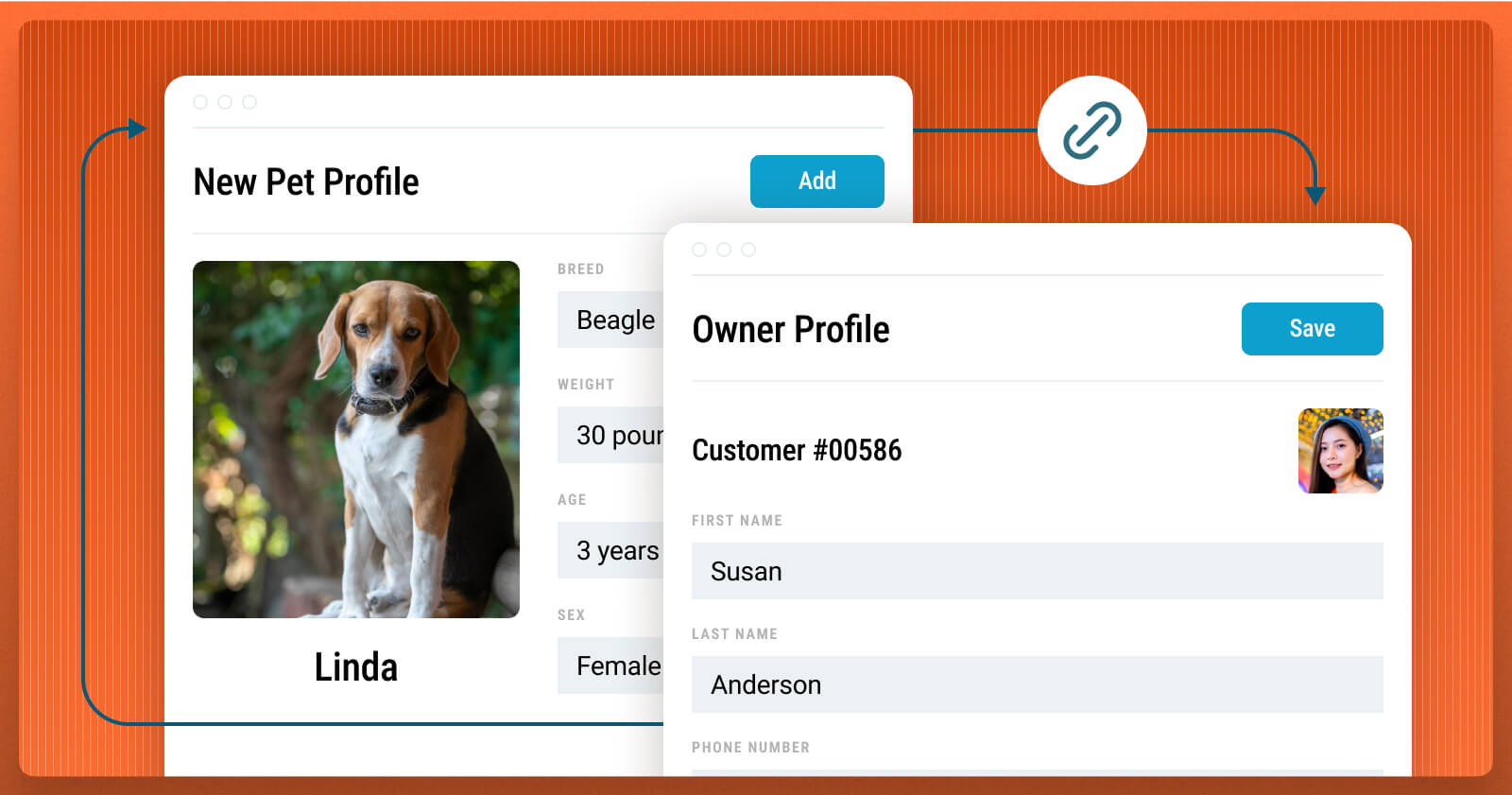
Multi-location access: Customer records, packages, credits, and memberships should follow the customer when the business allows them to use another location.
One Goose feature I value is the separation of staff care instructions from information supplied by the customer. Teams develop useful shorthand for feeding and care. Keeping that internal context in the right place reduces confusion and protects the customer-facing record.
What goes into the CRM record? At a minimum, you should make sure your CRM supports the following:
Pet Parents
Pets
Contact information
Weight
Service agreement
Breed
Credit and/or wallet balance
Altered status
Veterinarian
Age
Notes
Temperament test status
Pets
Medications
Associated contacts
Feeding & care
Prior visits
Vaccination history & records
Previous appointment details
Veterinarian contact information
Past invoices
Photos of the pet
Notes
Prior visits
Previous appointment details
Past invoices
Reporting
Basic reporting capabilities are vital for accounting and business analytics. At a minimum, you should be able to replicate the reports you rely on in the software you’re evaluating.
One often-overlooked issue is whether the software supports the accounting method your business uses. Cash and accrual reporting can produce very different answers when deposits are collected before care is delivered or a boarding stay crosses month end.
Method
When revenue is recognized
Best Suited For
Challenges
Cash Basis
When payment is received.
Smaller businesses with simpler accounting needs.
Deposits and future stays can make operating performance look different from service delivery.
Accrual Basis
When the service is delivered, regardless of when payment arrives.
Businesses that need a clearer match between revenue and the period in which care was provided.
Cross-month stays, deferred revenue, refunds, and mid-stay changes must be allocated correctly.
A platform that waits until checkout to recognize the entire value of a multi-day boarding stay can distort month-end reporting. Ask the vendor to show a more complicated (and realistic) stay that begins in one month and ends in the next, with a deposit paid in advance and an add-on added during the stay to determine if this is handled appropriately.
A capable reporting system should quickly answer questions such as:
How many pets are in the facility now, and how many arrive or depart during each time window?
What are revenue, discounts, refunds, deposits, and taxes by service and location?
How do occupancy, pet nights, average nightly rate, and add-on attachment change over time?
Which customers, services, locations, and channels are growing or declining?
Communication
A pet care operating system should support both operational communication and marketing. At a minimum, staff need ad hoc email and text messaging, a record of past conversations, reservation confirmations, appointment reminders, cancellation notices, and vaccination reminders.
SMS and email updates lead to happier clients and better reviews.
Messaging cost deserves attention. Some vendors charge per message, while others charge per carrier segment. A longer text, emoji, or image can use several segments, so a low headline rate does not always produce a low monthly bill. Calculate how much you might end up paying based on your actual message volume, including photos and multimedia.
Marketing texts also require a documented opt-in and an easy way to opt out. The system should distinguish marketing consent from transactional messages and keep a record of how consent was obtained. This is both good practice and an area where legal requirements matter.
Payments and Credit Card Fee Recovery
Payments should feel like part of the operating system. The booking, invoice, deposit, transaction, refund, tip, payout, and report should all connect. An integrated solution may cost slightly more per transaction than a stand-alone terminal, but manual card entry and reconciliation can make the cheaper option surprisingly expensive.
Important capabilities include:
Prepayments, deposits, refunds, split tenders, tips, gift cards, wallets, packages, and memberships.
Terminals that work where your team needs them and accept the payment methods customers use.
Clear settlement, payout, chargeback, and reconciliation reporting.
Permission controls for refunds, discounts, fee removal, and overrides.
Convenient payments keep things simple, making life easier for everyone.
Credit card fee recovery now deserves its own review. Goose Credit Card Offset is designed to recover most of eligible credit card processing costs. Gingr supports a configurable surcharge of up to 3% on eligible credit card transactions and excludes debit. MoeGo meanwhile allows customers to either pass the full transaction or a specified credit card rate to the customer but makes the customer more responsible for compliance. Paw Partner did not publicly list a built-in fee-recovery option when this guide was researched.
State laws and card-network rules vary. Ask which transactions qualify, how debit is identified, what appears on the receipt, how refunds are handled, who completes any required registration, and who is responsible for ongoing compliance. Get professional advice when the answer is unclear. This is not the place to rely on “I think we are fine.”
Customer Access
Self-service reduces front-desk work and gives customers more control. At a minimum, customers should be able to book, view upcoming reservations, update pet and vaccine information, pay, retrieve invoices, review policies, and contact the business.
A native app can add value when it provides useful notifications, camera access, fast repeat booking, or other reasons to open it regularly. A mobile-optimized website can be just as effective when it performs the same jobs without requiring an installation. Test both experiences yourself, and read current app reviews before assuming an app is automatically better.
User Permissions
The system should control access to financial reports, customer exports, discounts, refunds, price overrides, and administrative settings. Multi-location groups may need permissions by corporate level, brand, location, department, and role.
Important changes should also leave an audit trail showing who changed what and when. We have heard too many stories about a departing employee making one last creative contribution to the system. Good permissions prevent most of those stories from becoming yours.
4. Multi-Location Considerations
Running a pet care business across multiple locations introduces a whole new set of challenges. The complexity of managing your services and the customers who utilize those services across locations increases exponentially, and the software you choose needs to be equipped to handle it. It’s no longer just about managing one facility; now you need a system that can seamlessly connect everything while giving you a bird’s-eye view of your entire operation. From syncing customer information and managing reservations across locations to streamlining staff workflows, multi-location businesses require more robust software solutions.
Customer Perspective
If someone visits two locations, the experience should still feel like one business. Staff should be able to find the customer, see prior services, understand eligibility, and honor packages, credits, or memberships according to your rules. Re-entering the same profile at every location is not a multi-location experience.
Corporate Standards and Local Flexibility
Multi-location businesses usually want consistent services, policies, tags, customer communications, and reporting definitions. Local managers still need control over schedules, staffing, room availability, and occasional exceptions. The platform should make the boundary clear.
Ask which settings can be created once and inherited, which can be overridden locally, and how changes are rolled out. Rebuilding the same offer or tag at every location becomes a surprisingly expensive hobby once the group grows.
Security
Permissions should follow the organization. Corporate leaders may need access across every brand and location, general managers may need one facility, and front-desk or care teams may need only the tools required for their role. The system should also support prompt deactivation, strong authentication, and audit history.
Data security starts with smart access control.
Reporting
Multi-location reporting should provide a consolidated view of the business and make location comparisons easy. A leader should be able to move from the entire company to a brand, location, service, or period without changing definitions along the way.
This becomes especially important when outside investors, lenders, or other stakeholders are involved. Ask whether every location uses the same chart of accounts and revenue rules, how intercompany activity is handled, and whether exports can feed your accounting or business-intelligence systems.
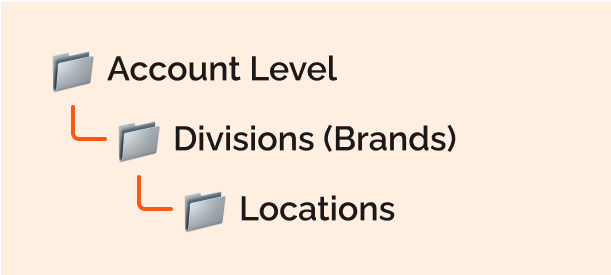
Corporate Structure
Lastly, it's important to ensure that the software you choose can accurately represent your corporate structure. This hierarchy within the software should mirror your business setup, giving you the flexibility and control you need when it comes to reporting and managing access for your team. If your operation is complex, you might want to have an account setup that looks something like this:
5. Customer Support
Support often receives less attention than features because every vendor is extremely attentive before the contract is signed. The real test begins after the salesperson stops checking in every other day. Implementation, training, and ongoing help determine how much value the business actually gets from the software.
Onboarding and Data Migration
Ask exactly who is responsible for setup. Some vendors provide a hands-on implementation team that migrates data, configures the account, and gives you a sandbox to review before launch. Others provide a few calls and expect your team to build most of the system. Either model can work, but the time commitment is very different.
Data migration should be discussed in detail before the contract is signed. Customer names are the easy part. Existing reservations, balances, packages, memberships, vaccination records, notes, transaction history, and financial data are where migrations become complicated.
How many years of customer, pet, and transaction history can be imported?
Will future reservations, deposits, balances, packages, and memberships transfer?
Who cleans and maps the data, and what happens when fields do not match?
Will the team receive a test migration before the final cutover?
How long will the old system remain available, and who handles final reconciliation?
Training and Onboarding
Installing the software is just the beginning. Your team still needs to know how to use it effectively. Ideally, you’ve chosen software that’s intuitive enough to require minimal training. However, training can become complicated when the software’s core services operate in unique or unfamiliar ways. Not long ago, most pet care providers focused on a single service, whether boarding, grooming, or training (daycare wasn’t even on the radar). Fast forward to today, and most facilities offer multiple services by default.
Providing onsite training at Urban Pooch
Many legacy systems, built for a different era, have separate processes for each service. This increases training time since you’re essentially teaching your staff to use multiple systems, even though they’re part of the same platform. Additionally, these older systems may not communicate well with each other, so if a customer cancels a reservation involving multiple services, you might need to manually update inventory across different modules.
Support
Having someone you can reach out to can help you quickly overcome obstacles and get back on track. It’s frustrating when a simple question leads you through a maze of automated bots and technical documents just to speak with a human. While your software provider should have extensive online resources, they should also offer multiple support channels, including phone, email, and chat. You need to be able to reach out during stated hours to resolve issues, not just receive a how-to video or document.
Ask for typical first-response and resolution times, how urgent issues are escalated, and whether support is provided by employees or an outsourced team. Then test the support channel before you buy. Submit a realistic question and see what happens.
Documentation still matters. Clear articles and short videos can solve a question faster than waiting for a reply, but only when they are current. A help center that describes last year’s interface is less of a resource and more of a scavenger hunt.
6. Software Platform and Engineering
The technical foundation rarely appears in a polished demo, but it affects speed, reliability, security, integrations, and how quickly the product improves. You do not need to become a software architect. You do need to ask a few practical questions.
Hosting
If uptime is critical to your business (and it absolutely should be), you’ll want to ensure that the software you're considering is hosted on a rock-solid, reliable platform. This is especially important in pet care, where any downtime can lead to missed bookings, frustrated customers, and potential revenue loss. A reliable hosting platform ensures your software stays online, your data remains secure, and backups are in place should something go wrong.
Amazon Web Services
Microsoft Azure
Google Cloud Platform
IBM Cloud
Oracle Cloud Platform
These platforms are global giants, known for their reliability, scalability, and comprehensive security features. They offer advanced backup systems, ensuring your data is always safe and accessible. If one of these services experiences an outage, you can rest assured the issue is significant enough to affect many major services worldwide, not just your business.
Self-hosted or downloadable systems are not automatically bad, but they place more responsibility on the operator and often make updates, backups, and security harder. Understand who owns each task before you accept it.
Mobile Capabilities
A mobile app can be useful, but an app icon is not a strategy. If the app simply recreates a clumsy website in a smaller box, nobody wins. Staff and customers should be able to complete the tasks they actually perform on a phone without zooming, pinching, or giving up.
Test booking, payment, profile updates, communication, check-in, task completion, and photo sharing on a real phone. Also review current ratings and recent comments in the app stores. A white-labeled app with poor reviews still carries your name.
Your app should be more than just a webpage.
Feature Roadmap
Software is never quite finished. The useful question is whether the company continues to improve the product at a pace that matches the market and the promises made during the sale.
What were the last two meaningful releases?
How often are updates and bug fixes shipped?
How are customer requests prioritized?
Which roadmap items are committed, and which are only ideas?
Will a promised feature be included in your plan when it launches?
Treat “coming soon” as unavailable until it is live. I say that as someone who works for a software company. Roadmaps move, priorities change, and demos are much easier than production software.
Data Ownership and Portability
It’s essential to ensure that the software company has strong data retention policies. Storing data can be costly, so it’s important to ask how long they keep your information. Contact and pet data should be retained indefinitely, and transaction data should be stored for several years (five years is a good benchmark).
Some providers (not Goose) might charge extra for data storage, so be clear on those policies. For instance, if your CRM exceeds a certain number of contacts, you could face additional fees or be pushed into a more expensive pricing tier.
On a performance level, how data is stored can significantly impact your day-to-day operations. If the system needs to keep old transaction data in memory constantly, it could slow down the entire application. Some services, like Goose, automatically archive older data, making it accessible without slowing down the system. Other platforms may require you to contact customer support to archive data, by which point you may have already noticed sluggish performance.
I firmly believe that your data belongs to you, no matter which software provider you choose. Therefore, it’s crucial to understand their data policies. Many people assume they can easily export their data, but it’s worth challenging this assumption during your initial sales conversations. At a minimum, you should be able to export a CSV file containing all your customer records, pet information, and a reasonable amount of recent transactions. This data portability ensures that you have the flexibility to make future software decisions without feeling locked into a single platform.
If this were a J.G. Wentworth ad: “It’s my data, and I need it now”
7. Evaluating The Company
When buying software for the long term, you are choosing a product and a company. Features matter today, but the company’s priorities, resources, and operating discipline determine what the product may look like several years from now.
Ownership and Incentives
Privately owned, venture-backed, and private equity-backed companies can all build excellent or frustrating products. Ownership alone might tell you a little about the company’s goals, but it is more useful to understand the incentives and evidence in front of you.
Does the company have a stated mission? What do they intend to be? for whom?
Is the company investing in engineering, implementation, and support?
Are releases focused on customer value, financial extraction, or both?
How long has the leadership team been involved in the category?
Can the company explain its priorities without relying on vague promises?
Market Presence
An established vendor can offer a large customer community, experienced employees, and many operators who already know the system. A smaller or newer company may offer more attention and a faster product pace. The 800-pound gorilla is comforting until you need it to notice you.
Reviews
Reviews are useful when you look for patterns rather than averages. Incentives, review gating, and unusually vocal customers can distort the score. Read recent negative reviews and note repeated themes around reliability, support, payments, migration, or missing workflows.
Many companies actively manage their reviews or engage in practices like "review gating," where only their happiest customers are encouraged to post reviews. This often leads to a mix of polarizing 5-star and 1-star reviews—those who love the product and those frustrated enough to speak out.
Then speak with customers who resemble your business. Ask what surprised them during implementation, which workarounds remain, how the vendor responds when something goes wrong, and whether they would make the same decision again. A five-minute conversation at a trade show can be more revealing than an hour of polished demo slides.
8. Cost and Total Cost of Ownership
Let’s break down a simple 3-tier model:
I wanted to wrap up this book by discussing cost because, all too often, it’s the first thing people consider, sometimes to the detriment of everything else. If the software doesn’t meet your needs, you could end up spending more time and money trying to make it work. What seems like a great deal upfront can quickly turn into a costly mistake. On the flip side, some features are worth the extra investment. For example, how much would you pay for a tool that boosts your revenue by 30%? When you look at it that way, a higher price tag can be easier to justify. Ultimately, the focus should be on the value the software delivers, not just the sticker price.
The truth is, we tend to fixate on an industry-standard price rather than the actual value the software delivers. I know some people who balk at the idea of paying $50 more per month, yet willingly spend three or four times as much on review management alone.
Public pricing changes, and larger accounts are often priced by locations, volume, services, or payment processing. Build a three-year total cost using the same assumptions for every vendor:
Base subscription, location fees, and annual increases.
Implementation, configuration, migration, and training.
Users, seats, roles, or staff accounts.
Email, SMS, MMS, phone numbers, storage, and overages.
Marketing, reputation, AI, attribution, revenue management, memberships, and other modules.
Payment processing, terminals, chargebacks, PCI or compliance fees, instant payouts, and minimums.
Integrations, API access, exports, cameras, kiosks, and other hardware.
Contract minimums, cancellation fees, and the cost of retrieving data when you leave.
Messaging and seat-based pricing deserve particular scrutiny. A low starting price can be offset by high overages. Per-seat pricing can also encourage shared logins, which creates accountability and security problems. Ask for a sample invoice based on your actual staffing and message volume.
Contracts
A vendor may advertise monthly pricing while requiring a 12-month commitment. Read the renewal, cancellation, price-increase, payment-processing, and data-exit terms. A longer contract should come with a meaningful benefit, not merely a longer obligation.
9. How to Evaluate Software in a Demo
Most demos are designed around a clean, simple workflow. Your business is neither clean nor simple, at least not all day. Bring the complexity with you and ask the vendor to complete real scenarios live.
Write down the five workflows that create the most work, risk, or lost revenue today.
Use the same scenarios with every vendor so the comparison is fair.
Ask to drive part of the demo or use a sandbox.
Include front desk, operations, accounting, and marketing when their workflows are being evaluated.
Record manual steps, plan restrictions, integrations, and anything described as coming soon.
Request written answers for pricing, compliance, migration, reporting, and contract questions.
Speak with customers that resemble your business before making the final decision.
Scenarios Worth Testing
When you finally get to the live demo, you should evaluate it based on your own experiences. In the absence of that, here are a few scenarios that can expose how well a system truly functions:
A brand-new customer books two pets for boarding, adds grooming to one pet, provides a deposit, and needs a behavioral evaluation.
A regular customer changes dates and adds a service after booking.
A holiday reaches high occupancy, assume you’d like that to trigger a rate change, minimum booking value, or restricted offer set.
A customer has an expired vaccine and tries to book online.
The checkout flow of a boarding stay that crosses month end, includes a deposit, and a mid-stay add-on.
A groomer becomes unavailable and the day must be rescheduled.
A customer abandons a booking.
A Google or Meta ad leads to a booking, how is that attributed.
A negative review is received on Google.
A multi-location customer buys a membership at one location and uses benefits at another.
10. Conclusion
Choosing the right software for your pet care business requires a thorough evaluation of features, support, pricing, and long-term value. This guide serves as a comprehensive checklist to help you make an informed decision that aligns with your business goals and improves your operations.
One final piece of advice: take the time to test the software yourself. Dive in, explore the features, and run through the scenarios you encounter most frequently. Consider how this new software could address the challenges you face today.
I also encourage you to keep an open mind to new possibilities. It's easy to stick with what’s familiar, but some of the most common practices in our industry, like request-based booking, were created out of necessity and might not fit the current environment. What I’m really trying to say is, don’t invest in new software just to maintain old habits that may not be serving your business well. Use this opportunity to critically evaluate your business practices and identify what truly works and what could be improved.
Other Goose guides
Resources to help you boost revenue and enhance customer satisfaction for your pet care business
Pet Care Membership
A step-by-step guide to launching a profitable, low-maintenance membership program for your pet care business.